AI-powered grocery planning

Your meals, planned.
Your cart, ready.

Type your week of dinners in plain English. MenuGrocer's AI builds a smart, aisle-by-aisle grocery list in seconds — sorted, scaled, and ready to shop.

Free forever plan  ·  No credit card required  ·  Works on any phone

20 min
Saved every week
$0
To get started
7
Aisle categories
2 seconds →
Your meal plan
Mon: pasta bolognese Tue: chicken stir fry + rice Wed: fish tacos Thu: butternut squash soup Fri: pizza night
↓ AI magic ↓
Your grocery list — sorted by aisle
Produce
Butternut squash1 large
Cherry tomatoes1 pint
Zucchini2
Meat & Seafood
Ground beef1 lb
Chicken breast1.5 lbs
White fish fillets4 pcs
Simple as it gets

Three steps to a
smarter cart

No complicated setup. No recipe database. Just type and shop.

01
Type your weekly meals

Write your dinners in plain English — any format works. "Monday: pasta" or just "pasta bolognese." No recipe links needed.

02
AI builds your grocery list

MenuGrocer extracts every ingredient, combines duplicates, scales for your family size, and skips pantry staples — in about 2 seconds.

03
Shop by aisle, check off as you go

Items sorted by grocery store aisle. Tap to check off. Share with your partner in one tap. Confetti when you're done.

Built for real families

Everything you need,
nothing you don't

MenuGrocer is laser-focused on one thing: getting you in and out of the grocery store faster. Every feature earns its place.

Aisle-by-aisle sorting

Produce, Meat, Dairy, Bakery, Pantry, Frozen — move through the store once without backtracking.

Serves scaler

Set how many people you're cooking for. Every quantity scales automatically — no math needed.

Pantry staples filter

Toggle off olive oil, salt, garlic — they'll never appear on your list again. Set once, benefit forever.

Saved meal library

Save your go-to meals. Next week, tap to re-add them instead of typing. The app gets faster over time.

One-tap sharing

Send the list to your partner via iMessage, WhatsApp, or copy as plain text to any app.

Dietary need filters

Set gluten-free, dairy-free, vegetarian, or nut-free. The AI avoids conflicting ingredients automatically.

Loved by families

What our users are saying

★★★★★

"I used to spend 20 minutes writing a grocery list every Sunday. Now I type my meals into MenuGrocer and I'm done in 30 seconds. The aisle sorting is genius."

SM
Sarah M.
Mom of 3 · Chicago, IL
★★★★★

"The pantry staples feature is the one that got me. I marked off salt, pepper, and olive oil once — I've never seen them on my list again. It just gets it."

DJ
Derek J.
Home cook · Austin, TX
★★★★★

"My husband and I shop together now. I generate the list, share it to his phone, we split up in the store. We're in and out in half the time."

LR
Lisa R.
Working parent · Seattle, WA

Ready to shop smarter?

Join thousands of American families saving time at the grocery store every single week.

Features

Everything your grocery run needs

From meal input to aisle-sorted list, MenuGrocer handles every step — and remembers your preferences forever.

Core feature

Free-text meal input that just works

No dropdowns, no recipe cards, no database to search. Type your meals exactly how you'd text a friend — "Monday: pasta" or just "tacos" — and the AI handles the rest.

  • Works with any format or shorthand
  • Handles brand names and colloquial dish names
  • Processes an entire week in under 2 seconds
  • Combines duplicate ingredients automatically
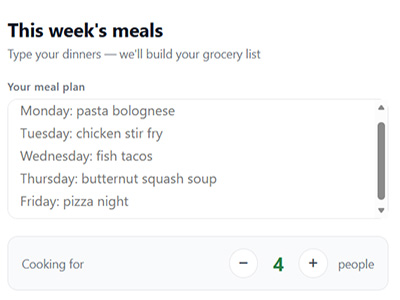
This week's meals
Mon: pasta bolognese
Tue: chicken stir fry
Wed: fish tacos
Thu: butternut squash soup
Fri: pizza night
Generate grocery list →
Biggest time-saver

Sorted by aisle — shop the store once

Every item automatically sorted into the right grocery store section. Move aisle by aisle, front to back, without ever backtracking to grab something you missed.

  • 7 categories: Produce, Meat, Dairy, Bakery, Pantry, Frozen, Drinks
  • Tap items to check off while you shop
  • Progress counter shows how close you are
  • Confetti when you finish (seriously)
Grocery list3 of 14 done
Produce
Butternut squash1 large
Cherry tomatoes1 pint
Zucchini2
Meat & Seafood
Ground beef1 lb
Chicken breast1.5 lbs
Personalization

Pantry staples — set once, never see again

Toggle off the items permanently stocked in your kitchen. They silently disappear from every future list. The longer you use MenuGrocer, the smarter it gets about your home.

  • 17 common items pre-loaded to get you started
  • Add your own custom staples anytime
  • Organized by category: oils, dry goods, fridge basics
  • Instantly reflected in your next list
Pantry staples
Olive oil
Salt & pepper
Pasta
Garlic

All of this, free to start

No credit card. No commitment. Just better grocery runs.

How it works

From meal plan to cart
in 30 seconds

A step-by-step look at how MenuGrocer turns your weekly dinner ideas into a perfectly organized grocery list.

1

Create your free account

Sign up with your email or Google account in about 30 seconds. No credit card required. You get 3 free grocery lists per month on the free plan — plenty to fall in love with it.

Tip: Bookmark MenuGrocer on your phone's home screen for instant access every Sunday during meal planning.
2

Set up your pantry staples (once)

Head to the Pantry tab. Toggle on everything you keep stocked at home — olive oil, salt, garlic, flour. This takes 2 minutes and pays off every single week forever. These items will never appear on your grocery list again.

Tip: We pre-load 17 common pantry items so you only need to toggle, not type.
3

Type your week of meals

Go to the Plan tab and type your dinners in plain English. Any format works — "Monday: chicken tacos," "taco Tuesday," or just "tacos." You don't need exact recipes. If you've used MenuGrocer before, tap your saved favorites from the Meals library instead of typing.

Tip: Lunches and breakfasts work too — just include them on separate lines.
4

Set your serving size

Tap +/− to set how many people you're cooking for. MenuGrocer adjusts every single ingredient quantity automatically. Cooking for 2 instead of 4? Half the beef, half the pasta, half everything — instantly.

Tip: Hosting a dinner party? Set serves to 8 or 10 and quantities scale right up.
5

Tap "Generate grocery list"

Hit the big green button. Our AI processes every meal, extracts every ingredient, combines duplicates, scales quantities, removes pantry staples, and returns a clean organized list — in about 2 seconds. The list is immediately ready to use.

6

Shop by aisle, check off as you go

Your list is sorted into grocery store aisles — Produce first, then Meat & Seafood, Dairy & Eggs, Bakery, Pantry, Frozen, Drinks. Move through the store once. Tap each item to check it off. When you get the last item — confetti! Share your list to a partner's phone so you can split up and finish in half the time.

Tip: The Share button sends plain text that works in iMessage, WhatsApp, or any notes app.

Ready to try it?

Takes 30 seconds to sign up. Your first list is on us.

Pricing

Simple, honest pricing

The free plan is genuinely useful. Upgrade only when you want more.

Monthly Annual Save 45%
Free
$0
Forever free — no card needed

3 grocery lists per month
Aisle-by-aisle sorting
Serving size scaler
Copy & share your list
Saved meal library
Pantry staples
Dietary filters
Unlimited lists
Annual
$3.29 /mo
$39.49 billed once per year

Everything in Family plan
45% cheaper than monthly
Price lock guarantee
Early access to new features
Best value

Frequently asked questions

No credit card required — ever — for the free plan. Sign up with your email or Google account and start generating lists immediately.
You'll see an upgrade prompt. You can either upgrade to the Family plan or wait until next month when your count resets automatically. We never charge you without your explicit consent.
Yes — cancel anytime from your account settings with one click. No cancellation fees, no questions asked. If you cancel mid-month, you keep access until the end of your billing period.
Yes. American, Mexican, Italian, Asian, sheet pan dinners, slow cooker meals — if it's a real dish, our AI knows the ingredients. The more specific you are, the more accurate the list.
Absolutely. We never sell your data to third parties. Your meal plans and grocery lists are yours. See our Privacy Policy for full details.
MenuGrocer is a web app that works on any device with a browser — iPhone, Android, iPad, desktop. Add it to your phone's home screen from Safari or Chrome for a native app-like experience with no download required.

Start free today

No credit card. No commitment. Your first list in 30 seconds.

Our story

We built the tool we wished existed

MenuGrocer started with a simple frustration: writing the same grocery list every week was eating 20 minutes we didn't have.

Every Sunday, the routine was the same. Sit down, flip through recipe ideas, write out ingredients by hand, realize you forgot something. Buy olive oil again even though you have three bottles at home.

Meal planning apps required you to use their recipe database. Grocery apps required you to shop at specific stores. Nothing just let you say "here's what I'm cooking this week, give me the list."

So we built it. MenuGrocer is that simple tool — type your meals in plain English, get an organized, aisle-sorted grocery list in seconds. No recipe database required. No specific store. No subscription to start.

We're a small, independent team based in the United States, focused entirely on making one thing really well: turning your meal ideas into a shopping list your whole family can actually use.

Speed first

We obsess over making every interaction instant. Your list should be ready before your coffee cools.

🎯
Focused simplicity

We add features only when they make grocery shopping measurably faster. No feature creep, ever.

🔒
Your data is yours

We don't sell your data. We don't show ads. MenuGrocer is funded by subscriptions, not surveillance.

💚
Real humans, real support

When you email us, a real person responds within 24 hours — usually much faster.

Come join us

Thousands of families are already shopping smarter. Your first list is free.

Contact us

We'd love to
hear from you

Get in touch

Have a question, a feature request, or just want to say hi? We're a small team and we read every single message. Expect a reply within 24 hours.

Email us
support@menugrocer.com
Response time
Within 24 hours, Mon–Fri 9am–6pm ET
Follow along
@MenuGrocer on Instagram & TikTok
Message sent!

Thanks for reaching out. We'll reply within 24 hours.